The Datastore and DNS services use a single point-to-point connection between the broker and the update server. The messaging services use an intermediate message broker (ActiveMQ, not to be confused with the OpenShift broker). This means that I need to configure and check not just one points, but three:
- Mcollective client to (message) broker (on OpenShift broker)
- Mcollective server to (message) broker (on OpenShift node)
- End to End
I'm using the ActiveMQ message broker to carry MCollective RPC messages. The message broker is interchangeable. MCollective can be carried over any one of several messaging protocols. I'm using the Stomp protocol for now, though MCollective is deprecating Stomp in favor of a native ActiveMQ (AMQP?) messaging protocol.
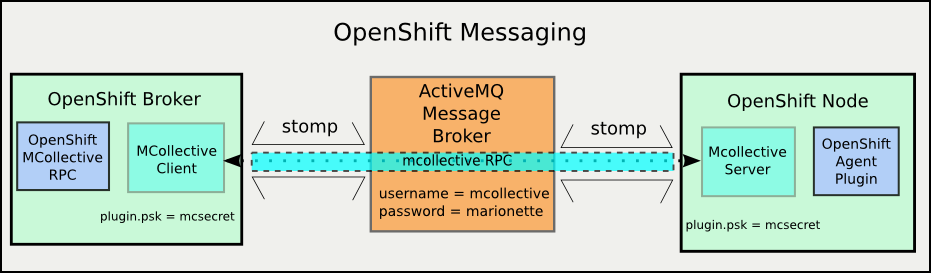 |
| OpenShift Messaging Components |
In a previous post I set up an ActiveMQ message broker to be used for communication between the OpenShift broker and nodes. In this one I'm going to connect the OpenShift components to the messaging service, verify both connections and then verify that I can send messages end-to-end.
Hold on for the ride, it's a long one (even for me)
Hold on for the ride, it's a long one (even for me)
Mea Culpa: I'm referring to what MCollective does as "messaging" but that's not strictly true. ActiveMQ, RabbitMQ, QPID are message broker services. MCollective uses those, but actually, MCollective is an RPC (Remote Procedure Call) system. Proper messaging is capable of much more than MCollective requires, but to avoid a lot of verbal knitting I'm being lazy and calling MCollective "messaging".
The Plan
Since this is a longer process than any of my previous posts, I'm going to give a little road-map up front so you know you're not getting lost on the way. Here are the landmarks between here and a working OpenShift messaging system:
- Ingredients: Gather configuration information for messaging setup.
- Mcollective Client -
Establish communications between the Mcollective client and the ActiveMQ server
(OpenShift broker host to message broker host) - MCollective Server -
Establish communications beween the MCollective server and the ActiveMQ server
(OpenShift node host to message broker host) - MCollective End-To-End -
Verify MCollective communication from client to server - OpenShift Messaging and Agent -
Install OpenShift messaging interface definition and agent packages on both OpenShift broker and node
Ingredients
| Variable | Value |
|---|---|
| ActiveMQ Server | msg1.infra.example.com |
| Message Bus | |
| topic username | mcollective |
| topic password | marionette |
| admin password | msgadminsecret |
| Message End | |
| password | mcsecret |
- A running ActiveMQ service
- A host to be the MCollective client (and after that an OpenShift broker)
- A host to run the MCollective service (and after that an OpenShfit node)
On the Mcollective client host, install these RPMs
- mcollective-client
- rubygem-openshift-origin-msg-broker-mcollective
- mcollective
- openshift-origin-msg-node-mcollective
Secrets and more Secrets
As with all secure network services, messaging requires authentication. Messaging has a twist though. You need two sets of authentication information, because, underneath, you're actually using two services. When you send a message to an end-point, the end point has to be assured that you are someone who is allowed to send messages. Like with a letter, having some secret code or signature so that you can be sure the letter isn't forged.
Now imagine a special private mail system. Before the mail carrier will accept a letter, you have to give them the secret handshake so that they know you're allowed to send letters. On the delivery end, the mail carrier requires not just a signature but a password before handing over the letter.
That's how authentication works for messaging systems.
When I set up the ActiveMQ service I didn't create a separate user for writing to the queue (sending a letter) and for reading (receiving) but I probably should have. As it is, getting a message from the OpenShift broker to an OpenShift node through MCollective and ActiveMQ requires two passwords and one username.
- mcollective endpoint secret
- ActiveMQ username
- ActiveMQ password
The ActiveMQ values will have to match those I set on the ActiveMQ message broker in the previous post. The MCollective end point secret is only placed in the MCollective configuration files. You'll see those soon.
MCollective Client (OpenShift Broker)
The OpenShift broker service sends messages to the OpenShift nodes. All of the messages (currently) originate at the broker. This means that the nodes need to have a process running which connects to the message broker and registers to receive MColletive messages.
Client configuration: client.cfg
The MCollective client is (predictably) configured using the
NOTE:if you're running on RHEL6 or CentOS 6 instead of Fedora you're going to be using the SCL version of Ruby and hence MCollective. The file is then at the SCL location:
Now I can test connections to the ActiveMQ message broker, though without any servers connected, it won't be very exciting (I hope).
If that's what you got, feel free to skip down to the MCollective Server section.
The mcollective server is a process that connects to a message broker, subscribes to (registers to receive messages from) one or more topics and then listens for incoming messages. When it accepts a message, the mcollective server passes it to a plugin module for execution and then returns any response. All OpenShift node hosts run an MCollective server which connects to one or more of the ActiveMQ message brokers.
I bet you have already guessed that the MCollective server configuration file is /etc/mcollective/server.cfg
NOTE: again the mcollective config files will be in
The server configuration looks pretty similar to the client.cfg. The securityprovider plugin must have the same values, because that's how the server knows that it can accept a message from the clients. The plugin.stomp.* values are the same as well, allowing the MCollective server to connect to the ActiveMQ service on the message broker host. It's really a good idea for the logfile value to be set so that you can observe the incoming messages and their responses. The loglevel is set to debug to start so that I can see all the details of the connection process. Finally the daemonize value is set to 1 so that the mcollectived will run as a service.
The mcollectived will complain if the YAML file does not exist or if the Meta registration plugin is not installed and selected. Comment those out for now. They're out of scope for this post.
When you're satisfied with the configuration, start the mcollective service and verify that it is running:
You should be able to confirm the connection to the ActiveMQ server in the log.
If you see that, you can skip down again to the next section, MCollective End-to-End
Again the two most likely problems are that the host or the stomp plugin are mis-configured.
If I see this, I need to check the same things I would have for the client connection. On the MCollective server host:
/etc/mcollective/client.cfg file. For the purpose of connecting to the message broker, only the connector plugin values are interesting, and for end-to-end communications I need the securityprovider plugin as well. The values related to logging are useful debugging too.# Basic stuff topicprefix = /topic/ main_collective = mcollective collectives = mcollective libdir = /usr/libexec/mcollective loglevel = log # just for testing, normally 'info' # Plugins securityprovider = psk plugin.psk = mcsecret # Middleware connector = stomp plugin.stomp.host = msg1.infra.example.com plugin.stomp.port = 61613 plugin.stomp.user = mcollective plugin.stomp.user = marionette
NOTE:if you're running on RHEL6 or CentOS 6 instead of Fedora you're going to be using the SCL version of Ruby and hence MCollective. The file is then at the SCL location:
/opt/rh/ruby193/root/etc/mcollective/client.cfgNow I can test connections to the ActiveMQ message broker, though without any servers connected, it won't be very exciting (I hope).
Testing client connections
MCollective provides a command line tool for sending messages: mco . mco is capable of several other 'meta' operations as well. The one I'm interested in first is 'mco ping'. With mco ping I can verify the connection to the ActiveMQ service (via the Stomp protocol) .
The default configuration file is owned by root and is not readable by ordinary users. This is because it contains plain-text passwords (There are ways to avoid this, but that's for another time). This means I have to either run mco commands as root, or create a config file that is readable. I'm going to use sudo to run my commands as root.
The mco ping command connects to the messaging service and asks all available MCollective servers to respond. Since I haven't connected any yet, I won't get any answers, but I can at least see that I'm able to connect to the message broker, send queries. If all goes well I should get a nice message saying "no one answered".
sudo mco ping


---- ping statistics ----
No responses received
If that's what you got, feel free to skip down to the MCollective Server section.
Debugging client-side configuration errors
There are a couple of obvious possible errors:
- Incorrect broker host
- broker service not answering
- Incorrect messaging username/password
The first two will appear the same to the MCollective client. Check the simple stuff first. If I'm sure that the host is correct then I'll have to diagnose the problem on the other (and write another blog post). Here's how that looks:
Note the message Could not connect to the Stomp Server.
If you get this message, check these on the OpenShift broker host:
If all of these are correct, then look on the ActiveMQ message broker host:
The third possibility indicates an information or configuration mismatch between the MCollective client configuration and the ActiveMQ server. That will look like this:
You can get even more gory details by changing the client.cfg to set the log level to debug and send the log output to the console:
I'll spare you what that looks like here.
sudo mco ping
connect to localhost failed: Connection refused - connect(2) will retry(#0) in 5
connect to localhost failed: Connection refused - connect(2) will retry(#1) in 5
connect to localhost failed: Connection refused - connect(2) will retry(#2) in 5
^C
The ping application failed to run, use -v for full error details: Could not connect to Stomp Server:
Note the message Could not connect to the Stomp Server.
If you get this message, check these on the OpenShift broker host:
- The plugin.stomp.host value is correct
- The plugin.stomp.port value is correct
- The host value resolves to an IP address in DNS
- The ActiveMQ host can be reached from the OpenShift Broker host (by ping or SSH)
- You can connect to Stomp port on the ActiveMQ broker host
telnet msg1.example.com 61613 (yes, telnet is a useful tool)
If all of these are correct, then look on the ActiveMQ message broker host:
- The ActiveMQ service is running
- The Stomp transport TCP ports match the plugin.stomp.port value
- The host firewall is allowing inbound connections on the Stomp port
The third possibility indicates an information or configuration mismatch between the MCollective client configuration and the ActiveMQ server. That will look like this:
sudo mco ping
transmit to msg1.infra.example.com failed: Broken pipe
connection.receive returning EOF as nil - resetting connection.
connect to localhost failed: Broken pipe will retry(#0) in 5

The ping application failed to run, use -v for full error details: Stomp::Error::NoCurrentConnection
You can get even more gory details by changing the client.cfg to set the log level to debug and send the log output to the console:
...
loglevel = debug # instead of 'log' or 'info'
logger_type = console # instead of 'file', or 'syslog' or unset (no logging)
...
I'll spare you what that looks like here.
MCollective Server (OpenShift Node)
The mcollective server is a process that connects to a message broker, subscribes to (registers to receive messages from) one or more topics and then listens for incoming messages. When it accepts a message, the mcollective server passes it to a plugin module for execution and then returns any response. All OpenShift node hosts run an MCollective server which connects to one or more of the ActiveMQ message brokers.
Configure the MCollective service daemon: server.cfg
I bet you have already guessed that the MCollective server configuration file is /etc/mcollective/server.cfg
# Basic stuff
topicprefix     = /topic/
main_collective = mcollective
collectives     = mcollective
libdir          = /usr/libexec/mcollective
logfile         = /var/log/mcollective.log
loglevel        = debug # just for setup, normally 'info'
daemonize       = 1
classesfile     = /var/lib/puppet/state/classes.txt

# Plugins
securityprovider = psk
plugin.psk       = mcsecret

# Registration
registerinterval = 300
registration     = Meta

# Middleware
connector         = stomp
plugin.stomp.host = msg1.infra.example.com
plugin.stomp.port = 61613
plugin.stomp.user = mcollective
plugin.stomp.password = marionette


# NRPE
plugin.nrpe.conf_dir  = /etc/nrpe.d

# Facts
factsource = yaml
plugin.yaml = /etc/mcollective/facts.yaml
NOTE: again the mcollective config files will be in
/opt/rh/ruby193/root/etc/mcollective/ if you are running on RHEL or CentOS.The server configuration looks pretty similar to the client.cfg. The securityprovider plugin must have the same values, because that's how the server knows that it can accept a message from the clients. The plugin.stomp.* values are the same as well, allowing the MCollective server to connect to the ActiveMQ service on the message broker host. It's really a good idea for the logfile value to be set so that you can observe the incoming messages and their responses. The loglevel is set to debug to start so that I can see all the details of the connection process. Finally the daemonize value is set to 1 so that the mcollectived will run as a service.
The mcollectived will complain if the YAML file does not exist or if the Meta registration plugin is not installed and selected. Comment those out for now. They're out of scope for this post.
Running the MCollective service
sudo service mcollective start
Redirecting to /bin/systemctl start  mcollective.service
ps -ef | grep mcollective
root     13897     1  5 19:37 ?        00:00:00 /usr/bin/ruby-mri /usr/sbin/mcollectived --config=/etc/mcollective/server.cfg --pidfile=/var/run/mcollective.pid
You should be able to confirm the connection to the ActiveMQ server in the log.
sudo tail /var/log/mcollective.log
I, [2013-09-19T19:53:21.317197 #16544]  INFO -- : mcollectived:31:in `' The Marionette Collective 2.2.3 started logging at info level
I, [2013-09-19T19:53:21.349798 #16551]  INFO -- : stomp.rb:124:in `initialize' MCollective 2.2.x will be the last to fully support the 'stomp' connector, please migrate to the 'activemq' or 'rabbitmq' connector
I, [2013-09-19T19:53:21.357215 #16551]  INFO -- : stomp.rb:82:in `on_connecting' Connection attempt 0 to stomp://mcollective@msg1.infra.example.com:61613
I, [2013-09-19T19:53:21.418225 #16551]  INFO -- : stomp.rb:87:in `on_connected' Conncted to stomp://mcollective@msg1.infra.example.com:61613
...
If you see that, you can skip down again to the next section, MCollective End-to-End
Debugging MCollective Server Connection Errors
Again the two most likely problems are that the host or the stomp plugin are mis-configured.
sudo tail /var/log/mcollective.log
I, [2013-09-19T20:05:50.943144 #18600]  INFO -- : stomp.rb:82:in `on_connecting' Connection attempt 1 to stomp://mcollective@msg1.infra.example.com:61613
I, [2013-09-19T20:05:50.944172 #18600]  INFO -- : stomp.rb:97:in `on_connectfail' Connection to stomp://mcollective@msg1.infra.example.com:61613 failed on attempt 1
I, [2013-09-19T20:05:51.264456 #18600]  INFO -- : stomp.rb:82:in `on_connecting' Connection attempt 2 to stomp://mcollective@msg1.infra.example.com:61613
...
If I see this, I need to check the same things I would have for the client connection. On the MCollective server host:
- plugin.stomp.host is correct
- plugin.stomp.port matches Stomp transport TCP port on the ActiveMQ service
- Hostname resolves to an IP address
- ActiveMQ host can be reached from the MCollective client host (ping or SSH)
On the ActiveMQ message broker:
- ActiveMQ service is running
- Any firewall rules allow inbound connections to the Stomp TCP port
The other likely error is username/password mismatch. If you see this in your mcollective logs, check the ActiveMQ user configuration and compare it to your mcollective server plugin.stomp.user and plugin.stomp.password values.
...
I, [2013-09-19T20:15:13.655366 #20240]  INFO -- : stomp.rb:82:in `on_connecting'
 Connection attempt 0 to stomp://mcollective@msg1.infra.example.com:61613
I, [2013-09-19T20:15:13.700844 #20240]  INFO -- : stomp.rb:87:in `on_connected'
Conncted to stomp://mcollective@msg1.infra.example.com:61613
E, [2013-09-19T20:15:13.729497 #20240] ERROR -- : stomp.rb:102:in `on_miscerr' U
nexpected error on connection stomp://mcollective@msg1.infra.example.com:61613: es_trans: transmit
 to msg1.infra.example.com failed: Broken pipe
...
MCollective End-to-End
Now that I have both the MCollective client and server configured to connect to the ActiveMQ message broker I can confirm the connection end to end. Remember that 'mco ping' command I used earlier? When there are connected servers, they should answer the ping request.
 sudo mco ping
node1.infra.example.com time=138.60 ms


---- ping statistics ----
1 replies max: 138.60 min: 138.60 avg: 138.60
OpenShift Node 'plugin' agent
Now I'm sure that both MCollective and ActiveMQ are working end-to-end between the OpenShift broker and node. But there's no "OpenShift" in there yet. I'm going to add that now.
There are three packages that specifically deal with MCollective and interaction with OpenShift:
There are three packages that specifically deal with MCollective and interaction with OpenShift:
- openshift-origin-msg-common.noarch (misnamed, specifically mcollective)
- rubygem-openshift-origin-msg-broker-mcollective
- openshift-origin-msg-node-mcollective.noarch
The first package defines the messaging protocol for OpenShift. It includes interface specifications for all of the messages, their arguments and expected outputs. This is used on both the MCollective client and server side to produce and validate the OpenShift messages. The broker package defines the interface that the OpenShift broker (a Rails application) uses to generate messages to the nodes and process the returns. The node package defines how the node will respond when it receives each message.
The OpenShift node also requires several plugins that, while not required for messaging per-se, will cause the OpenShift agent to fail if they are not present
- rubygem-openshift-origin-frontend-nodejs-websocket
- rubygem-openshift-origin-frontend-apache-mod-rewrite
- rubygem-openshift-origin-container-selinux
Mcollective client: mco
I've used mco previously just to send a ping message from a client to the servers. This just collects a list of the MCollective servers listening. The mco command can also send complete messages to remote agents. Now I need to learn how to determine what agents and messages are available and how to send them a message. Specifically, the OpenShift agent has an echo message which simply returns a string which was sent in the message. Now that all of the required OpenShift messaging components are installed, I should be able to tickle the OpenShift agent on the node from the broker. This is what it looks like when it works properly:
As you might expect, this has more than its fair share of interesting failure modes. The most likely thing you'll see from the mco command is this:
This isn't very informative, but it does at least indicate that the message was sent and nothing answered. Now I have to look at the MCollective server logs to see what happened. After setting the loglevel to 'debug' in
It turns out that the reason those three additional packages are requires is that they provide facters to MCollective. Facter is a tool which gathers a raft of information about a system and makes it quickly available to MCollective. The rubygem-openshift-origin-node package adds some facter code, but those facters will fail if the additional packages aren't present. If you do the "install everything" these resolve automatically, but if you install and test things piecemeal as I am they show up as missing requirements.
After I add those packages I can send an echo message and get a successful reply. If you can discover the MCollective servers from the client with mco ping, but can't get a response to an mco rpc openshift echo message, then the most likely problem is that the OpenShift node packages are missing or misconfigured. Check the logs and address what you find.
As you might expect, this has more than its fair share of interesting failure modes. The most likely thing you'll see from the mco command is this:
sudo mco rpc openshift echo msg=foo
Discovering hosts using the mc method for 2 second(s) .... 0

No request sent, we did not discover any nodes.
This isn't very informative, but it does at least indicate that the message was sent and nothing answered. Now I have to look at the MCollective server logs to see what happened. After setting the loglevel to 'debug' in
/etc/mcollective/server.cfg, restarting the mcollective service and re-trying the mco rpc command, I can find this in the log file:sudo grep openshift /var/log/mcollective.log D, [2013-09-20T14:18:05.864489 #31618] DEBUG -- : agents.rb:104:in `block in findagentfile' Found openshift at /usr/libexec/mcollective/mcollective/agent/openshift.rb D, [2013-09-20T14:18:05.864637 #31618] DEBUG -- : pluginmanager.rb:167:in `loadclass' Loading MCollective::Agent::Openshift from mcollective/agent/openshift.rb E, [2013-09-20T14:18:06.360415 #31618] ERROR -- : pluginmanager.rb:171:in `rescue in loadclass' Failed to load MCollective::Agent::Openshift: error loading openshift-origin-container-selinux: cannot load such file -- openshift-origin-container-selinux E, [2013-09-20T14:18:06.360633 #31618] ERROR -- : agents.rb:71:in `rescue in loadagent' Loading agent openshift failed: error loading openshift-origin-container-selinux: cannot load such file -- openshift-origin-container-selinux D, [2013-09-20T14:18:13.741055 #31618] DEBUG -- : base.rb:120:in `block (2 levels) in validate_filter?' Failing based on agent openshift D, [2013-09-20T14:18:13.741175 #31618] DEBUG -- : base.rb:120:in `block (2 levels) in validate_filter?' Failing based on agent openshift
It turns out that the reason those three additional packages are requires is that they provide facters to MCollective. Facter is a tool which gathers a raft of information about a system and makes it quickly available to MCollective. The rubygem-openshift-origin-node package adds some facter code, but those facters will fail if the additional packages aren't present. If you do the "install everything" these resolve automatically, but if you install and test things piecemeal as I am they show up as missing requirements.
After I add those packages I can send an echo message and get a successful reply. If you can discover the MCollective servers from the client with mco ping, but can't get a response to an mco rpc openshift echo message, then the most likely problem is that the OpenShift node packages are missing or misconfigured. Check the logs and address what you find.
Finally! (sort of)
At this point, I'm confident that the Stomp and MCollective services are working and that the OpenShift agent is installed on the node and will at least respond to the echo message. I was going to also include testing through the Rails console, but this has gone on long enough. That's next.
References
- ActiveMQ - Message Broker
- RabbitMQ - Message Broker
- QPID - Message Broker
- MCollective - RPC
- MCollective Client Configuration
- MCollective Server Configuration
- Stomp - messaging protocol
- AMQP (Advanced Message Queue Protocol)
- OpenWire - messaging protocol

