Wednesday, August 27, 2014

Intro to Containerized Applications: Docker and Kubernetes

Application Virtualization

In a world where a Hot New Thing In Tech is manufactured by marketing departments on demand for every annual trade show in every year there's something that is is stirring up interest all by itself (though it has it's own share of marketing help) The idea of application containers in general and Docker specifically has become a big deal in the software development industry in the last year.

I'm generally pretty skeptical of the hype that surrounds emerging tech and concepts (see DevOps) but I think Docker has the potential to be "disruptive" in the business sense of causing people to have to re-think how they do things in light of new (not yet well understood) possibilities.

In the next few posts (which I hope to have in rapid succession now) I plan to go into some more detail about how to create Docker  containers which are suitable for composition into a working service within a Kubernetes cluster.  The application I'm going to use is Pulp, a software repository mirror with life-cycle management capabilities.  It's not really the ideal candidate because of some of the TBD work remaining in Docker and Kubernetes, but it is a fairly simple service that uses a database, a messaging service and shared storage.  Each of these brings out capabilities and challanges intrinsic in building containerized services.

TL;DR.

Let me say at the outset that this is a long more philosophical than technical post. I'm going to get to the guts of these tools in all their gooey glory but I want to set myself some context before I start. If you want to get right to tearing open the toys, you can go straight to the sites for Docker and Kubernetes:


The Obligatory History Lesson


For 15 years, since the introduction of VMWare Workstation in 1999 [1], the primary mover of cloud computing has been the virtual machine. Once the idea was out there a number of other hardware virtualization methods were created: Xen, and KVM for Linux and Microsoft Hyper-V on Windows. Some of this software virtualization of hardware caused some problems on the real hardware so in 2006 both Intel and AMD introduced processors with special features to improve the performance and behavior of virtual machines running on their real machines. [2]

All of these technologies have similar characteristics. They also have similar benefits and gotchas.

The computer which runs all of the virtual machines (henceforth: VMs) is known as the host. Each of the VM instances is known as a guest. The guests each use one or more (generally very large) files in the host disk space which contains the entire filesystem of the guest. While each guest is running they typically consume a single (again,very large) process on the host.Various methods are used to grant the guest VMs access to the public network both for traffic out of and into the VM. The VM process simulates and entire computer so that for most reasonable purposes it looks and behaves as if it's a real computer.

This is very different from what has become known as multi-tenant computing. This is the traditional model in which each computer has accounts and users can log into their account and share (and compete for) the disk space and CPU resources. They also often have access to the shared security information. The root account is special and it's a truism among sysadmins that if you can log into a computer you can gain root access if you try hard enough.

Sysadmins have to work very hard in multi-tenant computing environments to prevent both malicious and accidental conflicts between their users' processes and resource use. If, instead of an account on the host, you give each user a whole VM, the VM provides a nice (?) clean (?) boundary (?) between each user and the sensitive host OS.

Because VMs are just programs, it is also possible to automate the creation and management of user machines. This is what has made possible modern commercial cloud services. Without virtualization, on-demand public cloud computing would be unworkable.

There are a number of down-sides to using VMs to manage user computing. Because each VM is a separate computer, each one must have an OS installed and then applications installed and configured. This can be mitigated somewhat by creating and using disk images. This is the equivalent of the ancient practice of creating a "gold disk" and cloning it to create new machines. Still each VM must be treated as a complete OS requiring all of the monitoring and maintenance by a qualified system administrator that a bare-metal host needs. It also contains the entire filesystem of a bare-metal server and requires comparable memory from its host.

Docker


For the buzzword savvy Docker is a software containerization mechanism. Explaining what that means takes a bit of doing. It also totally misses the point, because the enabling technology is totally unimportant. What matters is what it allows us to do. But first, for the tech weenies among you....

Docker Tech: Cgroups, Namespaces and Containers


Ordinary Linux processes have a largely unobstructed view of the resources available from the operating system. They can view the entire file system (subject to user and group access control). They have access to memory and to the network interfaces. They also have access to at least some information about the other processes running on the host.

Docker takes advantage of cgroups and kernel namespaces to manipulate the view that a process has of its surroundings. A container is a view of the filesystem and operating system which is a carefully crafted subset of what an ordinary process would see. Processes in a container can be made almost totally unaware of the other processes running on the host. The container presents a limited file system tree which can entirely replace what the process would see if it were not in a container. In some ways this is like a traditional chroot environment but the depth of the control is much more profound.

So far, this does look a lot like Solaris Containers[3], but that's just the tech, there's more.

The Docker Ecosystem


The real significant contribution of Docker is the way in which containers and their contents are defined and then distributed.

It would take a Sysadmin Superman to manually create the content and environmental settings to duplicate what Docker does with a few CLI commands. I know some people who could do it, but frankly it probably wouldn't be worth the time spent even for them. Even I don't really want to get that far into the mechanics (though I could be convinced if there's interest). What you can do with it though is pretty impressive.

Note: Other people describe better than I could how to install Docker and prepare it for use. Go there, do that, come back.

Hint: on Fedora 20+ you can add your use to the "docker" line in /etc/group and avoid a lot of calls to sudo when running the docker command.

To run a Docker container you just need to know the name of the image and any arguments you want to pass to the process inside. The simplest images to run are the ubuntu and fedora images:


docker run fedora /bin/echo "Hello World"
Unable to find image 'fedora' locally
Pulling repository fedora
88b42ffd1f7c: Download complete
511136ea3c5a: Download complete
c69cab00d6ef: Download complete
Hello World


Now honestly, short of a Java app that's probably the heaviest weight "Hello World" you've ever done. What happened was, your local docker system looked for a container image named "fedora" and didn't find one. So it went to the official Docker registry at docker.io and looked for one there. It found it, downloaded it and then started the container and ran the shell command inside, returning the STDOUT to your console.

Now look at those three lines following the "Pulling repository" output from the docker run command.

A docker "image" is a fiction. Nearly all images are composed of a number of layers. The base layer or base image usually provides the minimal OS filesystem content, libraries and such. Then layers are added for application packages or configuration information. Each layer is stored as a tarball with the contents and a little bit of metadata which indicates, among other things, the list of layers below it.. Each layer is given an ID based on a hash of the tarball so that each can be uniquely identified. When an "image" is stored on the Docker registry, it is given a name and possibly a label so that it can be retrieved on demand.

In this case Docker downloaded three image layers and then composed them to make the fedora image and then ran the container and executed /bin/echo inside it.

You can view the containers that are or have been run on your system with docker ps.


docker ps -l
CONTAINER ID IMAGE          COMMAND             CREATED        STATUS                     PORTS  NAMES
612bc60ede7a fedora:20     /bin/echo 'hello wor 7 minutes ago  Exited (0) 7 minutes ago          naughty_pike


You output will very likely be wrapped around unless you have a very wide terminal screen open. The -l switch tells docker only to print information about the last container created.

You can also run a shell inside the container so you can poke around. The -it switches indicate that the container will be run interactively and that it should be terminated when the primary process exits.


docker run -it fedora /bin/sh
sh-4.2# ls
bin etc lib lost+found mnt proc run srv tmp var
dev home lib64 media    opt root sbin sys usr
sh-4.2# ps -ef
 PID TTY     TIME     CMD
   1 ?       00:00:00 sh
   8 ?       00:00:00 ps
sh-4.2# df -k
Filesystem 1K-blocks   Used     Available Use% Mounted on
/dev/mapper/docker-8:4-2758071-97e6230110ded813bff36c0a9a397d74d89af18718ea897712a43312f8a56805 10190136 429260 9220204 5% \
tmpfs      24725556    0         24725556   0% /dev
shm        65536       0            65536   0% /dev/shm
/dev/sda4  132492664   21656752 104082428  18% /etc/hosts
tmpfs      24725556    0         24725556   0% /proc/kcore
sh-4.2# exit


That's three simple commands inside the container. The file system at / seems to be fairly ordinary for a complete (though minimal) operating system. It shows that there appear to be only two processes running in the container, though, and the mounted filesystems are a much smaller set than you would expect.

Now that you have this base image, you can use it to create new images by adding layers of your own.  You can also register with docker.io so that you can push the resulting images back out and make them available for others to use.

These are the two aspects of Docker that make it truly significant.

From Software Packaging to Application Packaging


Another historic diversion. Think about this: how do we get software?

Tarballs to RPMs (and Debs)


Back in the old days we used to pass around software using FTP and tarballs. We built it ourselves with a compiler.compress, gzip, configure and make made it lots faster but not easier. At least for me, Solaris introduced software packages, bundles of pre-compiled software which included dependency information so that you could just ask for LaTeX and you'd get all of the stuff you needed for it to work without having to either rebuild it or chase down all the broken loose ends.

Now, many people have problems with package management systems.  Some people have favorites or pets, but I can tell you from first hand experience, I don't care which one I have, but I don't want not to have one. (yes, I hear you Gentoo, no thanks)

For a long time software binary packages were the only way to deliver software to an OS. You still had to install and configure the OS. If you could craft the perfect configuration and you had the right disks you could clone your working OS onto a new disk and have a perfect copy. Then you had to tweak the host and network configurations, but that was much less trouble than a complete re-install.

Automated OS Installation


Network boot mechanisms like PXE and software installation tools, Jumpstart, Kickstart/Anaconda, AutoYAST and others made the Golden Image go away.  They let you define the system configuration and then would automate the installation and configuration process for you*.  You no longer had to worry about cloning and you didn't have to do a bunch of archaeology on your golden disk when it was out of date and you needed to make a new one. All of your choices were encapsulated in your OS config files.  You could read them, tweak them and run it again.

* yes, I didn't mention Configuration Management, but that's really an extension of the boot/install process in this case, not a fundamentally different thing.

In either case though, if you wanted to run two applications on the same host, the possibility existed that they would collide or interfere with each other in some way.  Each application also presented a potential security risk to the others.  If you crack the host using one app you could fairly surely gain access to everything else on the host.  Even inadvertent interactions could cause problems that would be difficult to diagnose and harder to mitigate.


Virtual Disks and the Rebirth of the Clones


With the advent of virtual machines,  the clone was back, but now it was called a disk image. You could just copy the disk image to a host and boot it in a VM.  If you want more you make copies and tweak them after boot time.

So now we had two different delivery mechanisms: Packages for software to be installed (either on bare metal or in a VM) and disk images for completed installations to be run in a VM. That is: unconfigured application software or fully configured operating systems.

You can isolate applications on one host by placing them into different VMs. But this means you have to configure not one, but three operating systems to build an application that requires two services.  That's three ways to get reliability and security wrong.  Three distinct moving parts that require a qualified sysadmin to manage them and at least two things which the Developer/Operators will need to access to make the services work.

Docker offers something new.  It offers the possibility of distributing just the application. *

* Yeah, there's more overhead than that, but nearly a complete VM and layers can be shared.

Containerization: Application Level Software Delivery


Docker offers the possibility of delivering software in units somewhere between the binary package and the disk image. Docker containers have isolation characteristics similar to apps running in VMs without the overhead of a complete running kernel in memory and without all of the auxiliary services that a complete OS requires.

Docker also offers the capability for developers of reasonable skill to create and customize the application images and then to compose them into complex services which can then be run on a single host, or distributed across many.

The docker registry presents a well-known central location for developers to push their images and name them so that consumers can find them, download them and use them without additional interaction. Because the application has been tested in the container, the developer can be sure that she's identified all of the configuration information that might need to be passed in and out.  She can explicitly document that, removing many opportunities for misconfiguration or adverse interactions between services on the same host.

It's the dawning of a new day.

If only it were that easy.

Here There Be Dragons


When a new day dawns on an unfamiliar landscape it slowly reveals a new vista to the eye. If you're in a high place you might see far off, but nearer things could be hidden under the canopy of trees or behind a fold in the land, so that when you actually step down and begin exploring you encounter surprises.

When ever a new technology appears people tend to try to use it the same way they're used to using their older tools. It generally takes a while to figure out the best way to use a new tool and to come to terms with its differentness.  There's often a lot of exploring and a fair number of false starts and retraced steps before the real best uses settle out.

Docker does have some youthful shortcomings.

Docker is marvelously good at pulling images from a specific repository (known to the world as the Docker.io Registry) and running them on a specific host to which you are logged on.  It's also good at pushing new images to the docker registry.  These are both very localized point-to-point transactions.

Docker has no awareness of anything other than the host it is running on and the docker registry.  It's not aware of other docker hosts nearby.  It's not aware of alternate registries.  It's not even aware of the resources in containers on the same host that container's might want to share.

The only way to manage a specific container is to log onto its host and run the docker command to examine and manipulate it.

The first thing anyone wants to do when they create a container of any kind is to punch holes in it.  What good is a container where you can't reach the contents?  Sometimes people want to see in.  Other times people want to insert things that weren't there in the first place. And they want to connect pipes between the containers, and from the containers to the outside world.

Docker does have ways of exposing specific network ports from a container to the host or to the host's external network interfaces.

It can import a part of the host filesystem into a container.  It also has ways to share storage between two containers on the same host.  What it doesn't have is a way to identify and use storage which can be shared between hosts.  If you want to have a cluster of docker hosts where the containers can share storage, this is a problem.

It also doesn't have a means to get secret information from... well anywhere... safely from its hidey hole into the container.  Since it's trivial for anyone to push an image to the public registry, it's really important not to put secret information into any image, even one that's going to be pushed to a private registry.

As noted, Docker does what it does really well.  The developers have been very careful not to try to over reach, and I agree with most of their decisions.  The issues I listed above are not flaws in Docker, they are mostly tasks that are outside Docker's scope.  This keeps the Docker development drive focused on the problems they are trying to solve so they can do it well.

To use Docker on anything but a small scale you need something else.  Something that is aware of clusters of container hosts, the resources available to each host and how to bind those resources to new containers regardless of which host ends up holding the container.  Something that is capable of describing complex multi-container applications which can be spread across the hosts in a cluster and yet be properly and securely connected. 

Read on.

Kubernetes


Who might want to run vast numbers of containerized applications spread over multiple enormous host clusters without regard to network topology or physical geography? Who else? Google.

Kubernetes is Google's response to the problem of managing Docker containers on a scale larger than a couple of manually configured hosts.  It, like Docker is a young project and there are an awful lot of TBDs, but there's a working core and a lot of active development.  Google and the other partners that have joined the Kubernetes effort have very strong motivation to make this work.

Kubernetes is made up of two service processes that run on each Docker host (in addition to the dockerd). The etcd binds the hosts into a cluster and distributes the configuration information.  The kubelet daemon is the active agent on each container host which responds to requests to create, monitor and destroy containers.  In Kubernetes parlance, a container host is known as a minion.

The etcd service is taken from CoreOS which is an attempt at application level software packaging and system management that predates Docker.  CoreOS seems to be adopting Docker as its container format. 

There is one other service process, the Kubernetes app-service which acts as the head node for the cluster. The app-service accepts commands from users and forwards them to the minions as needed. Any host running the Kubernetes app-server process is known as a master.

Clients communicate with the masters using the kubecfg command.

A little more terminology is in order.

As noted, container hosts are known as minions.  Sometimes several containers must be run on the same minion so that they can share local resources.  Kubernetes introduces the concept of a pod of containers to represent a set of containers that must run on the same host.  You can't access individual containers within a pod at the moment (there are lots more caveats like this.  It is a REALLY young project). 

Installing Kubernetes is a bit more intense than Docker.  Both Docker and Kubernetes are written in Go. Docker is mature enough that it is available as binary packages for both RPM and DEB packaged Linux distributions.  (see your local package manager for docker-io and it's dependencies.)

The simplest way to get Kubernetes right now is to run it in VirtualBox VMs managed by Vagrant. I recommend the Kubernetes Getting Started Guide for Vagrant . There's a bit of assembly required.

Hint: once it's built, I create an alias to the cluster/kubecfg.sh so I don't have to put it in my path or type it out every time.

I'm not going to show very much about Kubernetes yet.  It doesn't really make sense to run any interactive containers like the "Hello World" or the Fedora 20 shell using Kubernetes. It's really for running persistent services.  I'll get into it deeply in a coming post.  For now I'll just walk through the Vagrant startup and simple queries of the test cluster.


$ vagrant up
Bringing machine 'master' up with 'virtualbox' provider...
Bringing machine 'minion-1' up with 'virtualbox' provider...
Bringing machine 'minion-2' up with 'virtualbox' provider...
Bringing machine 'minion-3' up with 'virtualbox' provider...

==> master: Importing base box 'fedora20'...
...
master:
==> master: Summary
==> master: -------------
==> master: Succeeded: 44
==> master: Failed:     0
==> master: -------------
==> master: Total:     44
==> master:
==> minion-1: Importing base box 'fedora20'...
Progress: 90%
...
==> minion-3: Complete!
==> minion-3: * INFO: Running install_fedora_stable_post()
==> minion-3: disabled
==> minion-3: ln -s '/usr/lib/systemd/system/salt-minion.service' '/etc/systemd/system/multi-user.target.wants/salt-minion.service'
==> minion-3: INFO: Running install_fedora_check_services()
==> minion-3: INFO: Running install_fedora_restart_daemons()
==> minion-3: * INFO: Salt installed!

At this point there are only three interesting commands.  They show the set of minions in the cluster, the running pods and the services that are defined.  The last two aren't very interesting because there aren't any pods or services.

$ cluster/kubecfg.sh list minions
minions
----------
10.245.2.2
10.245.2.3
10.245.2.4

$ cluster/kubecfg.sh list pods

Name                Image(s)            Host                Labels

----------          ----------          ----------          ----------


$ cluster/kubecfg.sh list services

Name                Labels              Selector            Port

----------          ----------          ----------          ----------


We know about minions and pods.  In Kubernetes a service is actually a port proxy for a TCP port.  This allows kubernetes to place service containers arbitrarily while still allowing other containers to connect to them by a well known IP address and port.  Containers that wish to accept traffic for that port will use the selector value to indicate that. They service will then forward traffic to those containers.

Right now Kubernetes accepts requests and prints reports in structured data formats, JSON or YAML. To create a new pod or service, you describe the new object using one of these data formats and then submit the description with a "create" command.

Summary

I think software containers in general and Docker in particular have a very significant future.  I'm not a big bandwagon person but I think this one is going to matter.

Docker's going to need some more work itself and it's going to need a lot of infrastructure around it to make it suitable for the enterprise and for public cloud use.  Kubernetes is one piece that will make using Docker on a large scale possible.


See you soon.

References


Monday, August 18, 2014

Hey! I'm Back (and the Cloud is Bigger than Ever)

After a few months trying to do Businessy things that I don't think I'm very good at it looks like I could be back in the software dev/sysadmin space again for a while.

You'll notice a name change on the blog: It's no longer just about OpenShift.  Red Hat is getting into a number of related and extremely innovative and promising projects and trying to make them work together. I'm working to assist on a number of these projects where an extra hand is needed and I get to learn all kinds of cool stuff in the process.

The projects all revolve around one form of "virtualization" or another and all of the efforts are on taking these tools and using them to create enterprise class services.

OpenStack


OpenStack is essentially Amazon Web Services(r) for on-premise use.  To put it another way, it's an attempt to mechanize all of the functions of all of the groups in a typical enterprise IT department: networking, data center host management, OS and application provisioning, storage management, database services, user management and policies and more.

Merely replacing all of the people in an organization that do these things would be boring (and counterproductive). What OpenStack really offers is the ability to push control of the resources closer to the real user, offering self-service access to things which used to require coordination between experts and representatives from a number of different groups with the expected long lead times.  The ops people can focus on making sure there are sufficient resources to work, and the users, the developers and the applications admins can just take what they need (subject to policy) to do their work.

Now that's nice for the end user.  They get a snazzy dashboard and near-instant response to requests.  But the life of the sysadmin hasn't really changed, just the parts they run.  The sysadmin still has to create, monitor and support multiple complex services on real hardware. She also can't easily delegate the parts to the old traditional silos.  The sysadmin can't be just concerned with hardware and OS and NIC configuration.  The whole network fabric (storage too) all has to be understood by everyone on the design, deployment and operations team(s).  Message to sysadmins: Don't worry one bit about job security, so long as you keep learning like crazy.

Docker


Docker (and more generally "containerization") is the current hot growth topic.

Many people are now familiar with Virtual Machines.  A virtual machine is a process running on a host machine which simulates another (possibly totally different) computer.  The virtual machine software simulates a whole computer right down to mimicking hardware responses.  From inside the virtual machine it looks like you have a complete real computer at your disposal.

The downside is that VMs require the installation and management of a complete operating system withing the virtual machine.  VMs allow isolation but have a lot of heft to them.  The host machine has to be powerful enough to contain whole other computers (sometimes many of them) while still doing it's own job.

Docker uses some newish ideas to offer a middle ground between traditional multi-tenent computing, where a number of unrelated (and possibly conflicting) services run as peers on a single computer and the total isolation (and duplication) that VMs require.

The enabling technology is known as cgroups and specifically kernel namespaces.  The names are unimportant really.  What namespaces do is to allow the host operating system to provide each process with a distinct carefully tuned view of the parts of the host that the process needs to do its job. The view is called a container and any processes which run in the container can interact with each other as normal.  However they are entirely unaware of any other processes running on the host.  In a sense containers act as blinders, protecting processes running on the same host from each other by preventing them from even seeing each other.

Docker is a container service which standardizes and manages the development, creation and deployment of the containers and their contents in a clear and unified way.  It provides a means to create a single-purpose container for, say, a database service and then allows the

Kubernetes


While Docker itself is cool, it really focuses on the environment on a single host and on individual images and containers.  Kubernetes is a project initiated at Google but adopted by a number of other software and service vendors.  Kubernetes aims to provide a way for application developers to define and then deploy complex applications composed of a number of Docker containers and potentially spread over a number of container hosts.

I think Kubernetes (or something like it) is going to have a really strong influence on the acceptance and use of containerized applications.  It's likely to be the face most application operations teams see on the apps they deploy.  It's going to be critical both for both the Dev and Ops elements because it's going to be critical to the design and deployment of complex applications.

As a sysadmin this is where my strongest interest is.  Docker and Atomic are parts, Kubernetes is the glue.

Project Atomic


And where do you put all those fancy complex applications you've created using Docker and defined using Kubernetes?  Project Atomic is a Red Hat project to create a hosting environment specifically for containerized applications. 

Rather than running (I mean: installing, configuring and maintaining) a general purpose computer running the Docker daemon and a Kubernetes agent and all of the other attendant internals, Project Atomic will provide a host definition tuned for use as a container host.   A general purpose OS installation often has a number of service components which aren't necessary and may even pose a hazard to the container services.  Project Atomic is building an OS image designed to do one thing: Run containers.

Atomic is itself a stripped down general purpose OS.  It can run on bare metal, or on OpenStack or even on public cloud services like AWS or Rackspace or Google Cloud.


Go(lang)

It's been a long time since I worked in a system level language.  Go (or golang to distinguish it from the venerable Chinese strategy board game) is a new environment created by a couple of the luminaries of early Unix,  Robert Griesemer, Rob Pike, and Ken Thompson at Google.  It aims to address some of the shortcomings of C in the age of distributed and concurrent programming, neither of which really existed when C was created.

Docker and several other significant new applications are written in Go and it's catching on with system level developers.  I quickly bumped up on my scripting language habits when I started getting into Go and I was reminded of why system languages are still important.  It's refreshing to know I can still think at that level.

I think Go is going to spread quickly in the next few years and I'm going to learn to work with it along with the common scripting environments.

Look Up: There's more than one kind of cloud.


In the past I've been focused on one product and one aspect of Cloud Computing.  Make no mistake, Cloud Computing is still in it's infancy and we're still learning what kind of thing it wants to grow up into.  The range of enterprise deployment models is getting bigger.  Applications can be delivered as traditional software, as VM images for personal or enterprise use (VirtualBox and Vagrant to OpenStack to AWS) and now as containers which sit somewhere in between.  Each has its own best uses and we're still exploring the boundaries.

So now I'm going to branch out too and look at each of these and look at all of them.  My focus is still going to be what's going on inside, the place where you can stick your hand in and lose fingers.  Lots of other people are talking about the glossy paint job and the snazzy electronic dashboard.  I'll leave that to them.

Tut Tut... it looks like rain....(but I like the rain)

References


Friday, January 17, 2014

Hanging up my creeper and closing up shop.

I dunno if I have any fans of these blog posts, but if I do, I want to let you know that there aren't likely to be any more here. I've recently been moved into another group and I won't be working directly with OpenShift anymore. Never fear, the rest of the team is working like crazy as they always have to bring you great stuff and there are some real cool things coming down the line. Feel free to ask questions about what's here. I can certainly answer those until they become stale because the software has moved on. It's been fun. - Mark

Friday, December 13, 2013

OpenShift Service Development: Building a Build Box

I found this week that I needed to have build box so that I could repeatedly run the dev/build/install/test cycle. I've messed around with it on and off since i started working on OpenShift but I looked back and realized that I've never written a procedure for creating the build box. So here it is.

The build process takes source code from a git repository and transforms it into packages. Finally it places the packages into an install repository so that they will be available to the target hosts via yum. The yum repository is published by a small web server. It doesn't need to be fancy as it's just flat files.

The instructions here are for Fedora 18 or 19. There are some special considerations for RHEL6 or CentOS6. These are detailed in a section at the bottom of this post. There are notes inline for when the process is different for RHEL.

There are also some considerations for creating a build box in AWS EC2 (or any managed hosting service).

Install the build/publish software


On a minimal install of Fedora, install the base packages needed for the build service. Git to retrieve the source code, tito to build the RPMs, and thttpd to serve the YUM repository to the install targets.

sudo yum install git tito thttpd firewalld

(On RHEL6, enable EPEL repository and skip firewalld)

Create the YUM repository root directory


Next, create a location for the YUM repository. Place it in a space where thttpd will find it and make it writable by the build user (assumed to be the current user)


sudo mkdir /var/www/thttpd/tito
sudo chown $(id --name --user):$(id --name --group) /var/www/thttpd/tito

Enable Web Services


I have to publish the packages to the install hosts once they're built. I need a web server and on Fedora, I need the firewall daemon running and configured to allow HTTP communications.

sudo systemctl enable thttpd
sudo systemctl start thttpd

sudo systemctl enable firewalld
sudo systemctl start firewalld

# Open the port for now
sudo firewall-cmd --zone public --add-service http

# Make the change persistent across reboots
sudo firewall-cmd --zone public --add-service http --permanent

Configure Tito Output Location


Tito places the build results and RPMs in /tmp/tito by default. I can set the target location using the titorc file.


echo "RPMBUILD_BASEDIR=/var/www/thttpd/tito/" > $HOME/.titorc

Retrieve the Source Code Repository


Now that the publication and build services are prepared, it's time to actually get the software source code.

git clone https://github.com/openshift/origin-server.git

If you are doing development, substitute your own fork and branch. If you are doing your editing on the build box (not really recommended, but slightly time saving) you can also use the git: (ssh) protocol and add your github user SSH key so that you can both pull and push changes.

Install Package Build Requirements


Before you can build packages, you must also install any build requirements for the packages. The bourne shell code snippet below will walk the source code tree, find each package root and install all of the build requirements it finds using yum-builddep.

This triggers off the presence of a .spec file in the root of a package tree. It's critical as a package developer to note all build requirements in the .spec file.


for SPECPATH in $(find origin-server -name \*.spec)
do
    PKGDIR=$(dirname $SPECPATH )
    SPECFILE=$(basename $SPECPATH)
    (cd $PKGDIR ; sudo yum-builddep -y $SPECFILE )
done

Build All Packages

Now that all the build requirements are installed, it's time to build the software.

The bourne shell snippet below will walk the entire source tree and locate the root of each package tree and run tito to build the package. If you are building test packages, uncomment the TEST assignment line.

# TEST=--test
# SCL=--scl=ruby193 # for RHEL6
for SPECPATH in $(find origin-server -name \*.spec)
do
  PKGDIR=$(dirname $SPECPATH )
  SPECFILE=$(basename $SPECPATH)
  (cd $PKGDIR ; tito build --rpm $TEST $SCL)
done
createrepo /var/www/thttpd/tito

This snippet walks the source tree and runs tito to build each package.  The last line rebuilds the YUM repository metadata from the packages present.

You can build a single package by moving to the root of the package tree and running tito manually. You'll also have to re-run createrepo each time you update a package.  If you've rebuilt a package but yum claims there's no update available check that.

Which reminds me, if you're using yum for frequent updates (more than once a day), you'll also have to clear the metadata on the client machine so that it sees the updated packages


Building Test Packages


Tito builds not from the most recent commit. That is it ignores files in the workspace which have not been committed. It also requires at least one initial tito tag to operate.

Tito builds test packages by creating a temporary commit and tag. This allows it to create a package with a unique name for each test build. Each time you make a change and rebuild, a serial number is auto-incremented so that yum will see the new package as an 'update' and accept it in preference to any currently installed version.

Configuring a yum repo on the install host


You can supersede the stock Fedora or RHEL OpenShift package repositories by placing a new repo file in /etc/yum.repos.d

/etc/yum.repos.d/openshift_buildtest.repo
[openshift_buildtest]
name=OpenShift Build/Test repository
baseurl=http://build.example.com/tito/
enabled=1
gpgcheck=0

Considerations for RHEL6


There are two significant differences between Fedora and RHEL6 when creating a build box.

Firewall and Services on RHEL6


On RHEL6 systemd and firewalld are not available. Use iptables and lokkit instead of firewalld and firewall-cmd to open the TCP port for HTTP. Use service and chkconfig instead of systemctl to control services.


# Open Firewall for HTTP
sudo lokkit --service=http

# start and enable thttpd
chkconfig thttpd on
service thttpd start

RHEL6, OpenShift, Ruby/Rails versions and Software Collections


RHEL6 is .. special. OpenShift is written in Ruby 1.9.3 and Rails 3. These didn't exist or weren't stable when RHEL6 was created. Different Ruby versions don't play nicely on a single system (there have been at least 3 attempts I can find to get Ruby 1.8 and 1.9 to co-exists like Python 2 and 3. All have thrown up their hands in frustration). Given that, heroic measures were required to get them to run on RHEL6. Those heroic measures are called Software Collections. better known as "SCL".

What SCL does is provide a means to repackage software and run it in a special environment that isolates it from the rest of the system. The SCL team has re-packaged over 500 packages to run in the ruby193 environment on RHEL6. These are all needed to run OpenShift on RHEL6. They're also needed to build OpenShift for RHEL6.

Fortunately, the SCL and OpenShift teams have kindly provided a YUM repository for them. When you add the OpenShift dependencies repository to your YUM repo configurations all of the build dependencies will resolve. They've also added a switch to tito so that it will run your builds inside the SCL environment.
/etc/yum.repos.d/openshift-dependencies.repo
[openshift-dependencies]
name=OpenShift Dependencies
baseurl=http://mirror.openshift.com/pub/openshift-origin/nightly/rhel-6/dependen
cies/$basearch/
enabled=1
gpgcheck=0

There are other things in those dependencies repositories. There are a large number of update packages which OpenShift needs but which have not yet appeared upstream. On Fedora you'll still need the dependencies YUM repository to create the runtime hosts but you don't need them to build the OpenShift packages.

Considerations for EC2 hosting


If you're placing your build box in AWS EC2 there are a couple of additional things to consider:

  1. EC2 security_policy must allow HTTP (port 80/TCP)
    Your build instance must be created with a security policy which allows port 80/TCP for your install hosts.
  2. Internal Hostname
    EC2 hosts have an internal and external hostname. Both names are dynamic (unless you assign ElasticIP). If your install hosts are also on EC2 you can use the internal hostname and IP address for the security_policy.
  3. External Hostname
    If your install boxes are not hosted in EC2 then you must allow all hosts on port 80 TCP and note the EC2 public hostname so that the install hosts can access the build host web server.

OpenShift Source Code Repositories


  • origin-server -
    http://github.com/openshift/origin-server
  • rhc -
    http://githhub.com/openshift/rhc
  • origin-dependencies (SRPM repository)
    http://mirror.openshift.com/pub/openshift-origin/nightly/fedora-latest/dependencies/SRPMS/

OpenShift Dependencies RPM Repositories


  • Fedora -
    http://mirror.openshift.com/pub/openshift-origin/nightly/fedora-latest/dependencies/$basearch
  • RHEL6 -
    http://mirror.openshift.com/pub/openshift-origin/nightly/rhel-6/dependencies/$basearch

References

  • git - http://git-scm.com/
  • github - https://github.com
  • thttpd - http://www.acme.com/software/thttpd/
  • firewalld - https://fedoraproject.org/wiki/FirewallD
  • tito - http://linux.die.net/man/8/tito
  • Software Collections (SCL) - https://fedorahosted.org/SoftwareCollections/

Friday, October 11, 2013

Diversion: Kerberos (FreeIPA) in AWS EC2

One of the things many people are asking for in OpenShift is alternate ways of authenticating SSH and git interactions with the applications gears. Since I'm doing my development work in EC2, I thought that was surely the right place to try it out. Well as usual, it didn't work out quite as simple as I'd planned.

This post isn't about OpenShift directly.  It addresses what I found when I tried to implement FreeIPA in EC2 so that I could develop code to allow Kerberos authentication in OpenShift.

Kerberos in way too few words


Kerberos is an authentication protocol and service defined originally at MIT as part of Project Athena (along with things like the X Windows System and Zephyr, a predecessor to modern IM services). It is meant to provide authenticated on unencrypted and even untrusted networks. Perfect right? Well Kerberos has some quirks.

First, different people can run their own Kerberos services. To avoid conflicts, each service is given an identifier string known as a realm. By convention the realm string is the same as the enterprise DNS domain name. That is, if a company has DNS domain example.com then the Kerberos realm would be EXAMPLE.COM. Unlike DNS domain names, Kerberos realms are case sensitive.

Each participating host must be registered with the Kerberos server and each user must be added to the user list on the server as well. Hosts and users (and any other manageable entity) is identified with a principal. This is basically a name which is unique for each resource, err user, umm host.... thing. The important thing is that the host is identified by a string which is derived from its hostname.

Now wars have been fought over whether a hostname should be the Fully Qualified Domain Name (FQDN) or just the host portion. For Kerberos there is only one answer: FQDN.

The host principal for a given host is composed of the hostname, and the realm. When a client tries to log in, it needs to know the correct principal to request from the server. This is why the FQDN must be the hostname. When the user attempts to log in he must provide both his own principal and the host principal for the destination. The only way to know the destination's host principal is if it is related to the hostname as viewed from the client host.

This is where life gets interesting in AWS EC2.

You see, AWS uses RFC 1918 and something like Network Address Translation to create a private network for the virtual machines which make up the EC2 service. AWS also uses an internal DNS service to identify each virtual machine. This means that from the view of a host inside the private network, the destination host has a different IP address and a different hostname than when viewed from outside the private network. The upshot is that, to use Kerberos with EC2 I need some way to make sure that the user can determine a valid host principal to request regardless of where the user is located.

A Word about IPA and AWS


IPA (and FreeIPA) is not a single service.  It's a collection of services configured so that they work in concert to provide secure user and host access over untrusted networks.  Kerberos is only one of the services, though it is probably the core one.  LDAP, NTP and DNS are all support services which make the operation of Kerberos work.  IPA wraps these services in such a way so that mere mortals don't necessarily need to know how the bindings work merely to get the service running.

In this post I'm dealing almost entirely with the Kerberos service within IPA and I'll refer to that component by name.  Where I mention FreeIPA it will be in reference to the specific tools that FreeIPA provides to set up and manage the conglomerate service.

AWS (Amazon Web Services) is also a suite of services.  The core of that is the EC2 virtual host service. Again, all of the AWS services generally work together, but I'm only dealing with EC2 instances in this post so I'll refer to EC2 specifically unless I'm referring to the full suite.

UPDATE: 2013-11-07 - AWS TOS do not permit open DNS recursion.

One other thing to be aware of when running IPA in AWS.  Amazon terms of service do not allow users to create open recursive DNS services within AWS on the grounds that they can be abused.

When setting up your AWS security policies and the named service on your IPA hosts, be sure to disable recursion and/or limit access to appropriate IP ranges for your DNS clients or you'll get a polite nastygram from Amazon.

Kerberos, Linux and SSH


I want to use Kerberos with SSH so that I can avoid using SSH authorized_keys when pushing git updates to my applications on OpenShift. (mostly ignoring EC2 for now). To do that I need several things set up:

  • A Kerberos (FreeIPA) server - IPA installed, configured
  • A set of users configured into the FreeIPA service
  • A target host (OpenShift node)
For SSH the most important things are that the Kerberos and LDAP configurations are set up properly. This includes configuring sssd, and the /etc/nsswitch.conf settings. Luckly the FreeIPA ipa-client-install script (with the right inputs) will do all of that for me. I think there are ways to get it to tell me precisely what changes it's making but I haven't learned how yet. I do know that I can find the results in the /var/log/ipaclient-install.log.

The other thing I need to do is to make sure that the SSH client and server both will at least try to use the GSSAPI protocol for managing the authentication process. On the server this means making sure that the GSSAPIAuthentication is enabled.

On the client side, I may need to specify that I want to use the gssapi-with-mic authentication method. I may also need to specify the host principal to use to access the destination (as distinct from the hostname from the client's vantage point). More on these later.

EC2 , cloud-init and resisting dynamic naming


The network interface numbering and naming in EC2 are dynamic by design, both on the internal and external interfaces. EC2 does offer "elastic IP" which is really "static IP" for an instance and since I own a DNS zone I can assign a name to the address. Unfortunately this only offers control of the external IP address assigned to an instance. I have to find ways to manage the internal naming myself.


When a host registers with a Kerberos service it generally uses its own hostname as the identifier for the host principal. If this is the same as the DNS name associated with one or more if its IP addresses, this is just by convention. That is, Kerberos doesn't maintain the mapping. So if a host changes its hostname but no changes are made to the Kerberos database, the host can no longer identify itself by it's principal. Also, if the name by which it is known from the outside changes (because the IP address and/or DNS name changed) then clients will no longer know what principal to use to request an access ticket.

There are two factors here: Making sure the host knows its own name, and making sure that users coming from remote hosts can determine the (a?) valid principal (based on the hostname) to request a ticket for.

Maintaining Host Identity


For Kerberos, the hostname is the anchor for a host principal. If the hostname changes on a registered host, it will no longer be able to properly communicate with the Kerberos server and clients. Luckly the Fedora and RHEL images in EC2 use cloud-init to initialize potentially dynamic information on startup.

Cloud-init is software which, when installed on a host, can take input from the cloud environment and customize the host to integrate it into the environment. It can do things like.. oh, say, set the IP address of network interfaces and hostnames, install SSH host keys, set device mount points and the like. It will also allow me to tell it not to update the hostname on each reboot.

The main configuration for cloud-init is /etc/cloud/cloud.cfg. I just need to add a line containing 'preserve_hostname: 1' and set the hostname I want in /etc/hostname. From then on, restarts or reboots will keep the hostname I set. Given that value I have my anchor for registering the host with the kerberos server and maintaining the host/principal mapping.

The host now always knows its own name: part one solved.

The view from Inside/Outside


You do learn something every day. In talking with some of the FreeIPA developer folks I learned something I hadn't known about how the Kerberos protocol works. ;Here's the important bit.

When client wants to gain access to some resource, it sends a message to the kerberos server saying "I am this principal and I want access to that one over there, ok?" The Kerberos server sends back a signed/encrypted ticket with both names (principals) wrapped inside it. The client then sends the ticket in an authentication request to the destination host, who verifies "yep, that's me, and I can see that that's you, let me check are you allowed?" and if the answer is "yes" the client request is granted.

What this means is that the client must know the name (principal) of the destination resource before attempting to connect to the resource. It must know a name that both the kerberos server and the resource host itself will recognize. When everyone uses DNS FQDNs to identify hosts and they have the same view of DNS, this works nicely. Accessing private network resources from a public network creates some issues.

Most tools, SSH included, assume that they can compose a host principal from the hostname given by the user. So if a client was using realm EXAMPLE.COM and tried to reach a remote host with FQDN 'destination.example.com' the principal would be host/destination.example.com@EXAMPLE.COM. But since the EC2 hosts have (not one but two) random hostnames assigned when they boot, it's impossible to know from the hostname alone what the principal of the destination is.

If I happen to know the mapping (ie, what principal is associated with the destination host) then SSH allows me to specify that with -oGSSAPIServerIdentity=<principal> on the CLI or in a Host entry in my .ssh/config file. From the illustration above, to properly authenticate with the Kerberos Host I could do this:

ssh -oPreferredAuthentications=gssapi-with-mic -oGSSAPIServerIdentity=host1.example.com random2.external

(this also assumes that my local hostname and remote one are the same and that I've got a ticket-granting-ticket for the EXAMPLE.COM realm using kinit.)

What this says is to log into a host who's name (from this view) is random2.internal, and who's principal is host1.example.com. With that the local client can send a query to the Kerberos server and get the right ticket back to hand to the destination host. It can say "yep, that's me and yep you're you, and yep you're allowed"

The Many Faces of Kerberos


It's totally coincidence that Cerberos is the 3-headed dog that guards the landing in Hades on the river Styx and I'm going to add two "faces" to my kerberos clients. Totally.

I think that in the discussion above I've been careful to make it clear that a Kerberos principal is an identifier. That is, it is a handle which is used to refer to an object in the Kerberos database which corresponds to an object in reality. I have nick names. Hosts in Kerberos can have them too, and this is going to solve my identity problem with random dynamic names and IP addresses.

I've managed to give each host a fixed hostname, thanks to cloud-init. Once I know the dynamic names both public and internal I should be able to inform the Kerberos server of both of the aliases.

If this works, here's what will happen when I try to log in either from a host inside or outside the private network, my SSH client will form a principal from the (DNS) name I offer. My client will send that to the Kerberos server and request an access ticket to the remote host using the alias principal. And the Kerberos server will know which host that means. It will create an access ticket which will grant me access to the destination host, which will examine it and on finding everything in order, will allow my SSH connection.

It turns out that FreeIPA doesn't yet have a nice Web or CLI user interface to add principals to a registered host record, but the Kerberos database is stored in an LDAP server on the Kerberos master host. For now I (or a friend actually) can craft an LDAP query which will add the principals I need to the host record. This is assumed to be run on

kerberos# ldapmodify -h localhost -x -D "cn=Directory Manager" -W @lt;@lt;EOF
dn: fqdn=host1.example.com,cn=computers,cn=accounts,dc=example,dc=com
changetype: modify
add: krbprincipalname
krbprincipalname: host/random2.external@EXAMPLE.COM
krbprincipalname: host/random2.internal@EXAMPLE.COM
EOF

The invocation above will request the password of the admin user for the FreeIPA LDAP service. I'm sure there's a way to do it with Kerberos/GSSAPI, but I haven't got it yet.

What that change does is add two Kerberos principal names to the host entry for host1.example.com. The principal names match what an SSH client would construct using the DNS name (internal or external) to reach the target host. Now when the Kerberos server gets a ticket request from clients either inside or outside the private network, the principal in the ticket request will be associated with a known host.

The Devil's in the Dynamics


This is all fine so long as host1.example.com doesn't reboot. When it does, AWS will assign it a new internal and external IP address and new DNS names. It would be really nice if the host, when it boots could inform the Kerberos service what its new internal and external principal names are.

I don't currently know how to do this, but I suspect that I could add a module to cloud-init to do the job. The client is already configured to use the LDAP service on the Kerberos (FreeIPA) server. Once the server knows that all three principals refer to the same host life should be good.

Now to learn some cloud-init finagling and enough Kerberos so that I can have the host update itself on reboot.


What does this mean for OpenShift?


If you want to run an OpenShift service in AWS and you want to offer Kerberos authentication for SSH/git to the application gears, you'll have to do a little LDAP tweaking of the Kerberos principals associated with each host so that the Kerberos service will know which host you mean regardless of your view of the destination host.

The first round of Kerberos integration code is going into OpenShift Origin as I write this (the pull requst is submitted and getting commentary).  By the next release it should be possible to manage developer access to gears with Kerberos and FreeIPA.  Additional use cases will be added over time.

Summary


  • Cloud services like AWS and corporate networks often rely on private network spaces and Network Address Translation to manage dynamic hosts.
  • Cloud Init usually updates the hostname on each boot but this can be suppressed.
  • For a client trying to reach a host for SSH this poses a problem because the view of the destination from the client differs based on where the client sits in relation to the network boundary.
  • Kerberos can assign multiple principals to a single host, which allows authentication to work.

References

  • FreeIPA - A component based single-sign-on service 
  • Kerberos - The authentication component of FreeIPA and MIT Project Athena
  • GSSAPI - A standardized generic authentication and access control protocol
  • Project Athena - 1980s MIT/DEC/IBM project to design network services and protocols
  • RFC 1918 - Private non-routable IP address space reservations
  • Network Address Translation - Private network boundary system
  • AWS Elastic IP - AWS static IP addresses for dynamic hosts
  • Cloud Init - A service for customizing host configuration on reboot

Friday, September 27, 2013

Broker-Node interaction and visibility - Debugging "missing" cartridges on a node.

In the previous post I set up the end-point messaging for OpenShift. (Broker -> Messaging -> Node). I showed a simple use of the MCollective mco command and where the MCollective log files are. The last step was to send an echo message to the OpenShift agent on an OpenShift node and get the response back.

Now I have my OpenShift broker and node set up (I think) but something's not right and I have to figure out what.

DISCLAIMER: this post isn't a "how to" it's a mostly-stream-of-consciousness log of my attempt to answer a question and understand what's going on underneath.  It's messy.  It may cast light on some of the moving parts.  It may also lead me to a confrontation with The Old Man From Scene 24 and we all know how that ends. You have been warned.

In the paragraphs below I include a number of CLI invocations and their responses.  I include a prompt at the beginning of each one to indicate where (on which host) the CLI command is running.

  • broker$ - the command is running on my OpenShift broker host
  • node$ - the command is running on my OpenShift node host
  • dev$ - the command is running on my laptop

I've also got a copy of the origin-server source code checked out from the repository on Github.

I've got my rhc client already configured for my test user (cleverly named 'testuser') and my broker (using the libra_server variable). See ~/.openshift/express.conf if needed.

What's going on here?

I started trying to access the Broker with the rhc CLI command to create a user, register a namespace and then create an application. I'd like to create a python app and I've installed the openshift-origin-cartridge-python package to provide that app framework. But when I try to create my app I'm told that Python is not available:


client$ rhc create-app testapp1 python
Short Name Full name
========== =========

There are no cartridges that match 'python'.

So I figure I'll ask what cartridges ARE available:

client$ rhc cartridges

Note: Web cartridges can only be added to new applications.

Now, when I look for cartridge packages on the node I get a different answer:

node$ rpm -qa | grep cartridge
openshift-origin-cartridge-abstract-1.5.9-1.fc19.noarch
openshift-origin-cartridge-cron-1.15.2-1.git.0.aa68436.fc19.noarch
openshift-origin-cartridge-php-1.15.2-1.git.0.090a445.fc19.noarch
openshift-origin-cartridge-python-1.15.1-1.git.0.0eb3e95.fc19.noarch

Somehow, when the broker is asking the node to list its cartridges, the node isn't answering correctly. Why?

I'm going to see if I can observe the broker making the query to list the nodes and then see if I can determine where the node is (or isn't) getting its answer.

Refresher: MCollective RPC and OpenShift


MCollective is really an RPC (Remote Procedure Call) mechanism. It defines the interface for a set of functions to be called on the remote machine. The client submits a function call which is sent to the server. The server executes the function on behalf of the client and then returns the result.

The OpenShift client adds one more level of indirection and I want to get that out of the way. I can look at the logs on the broker and node to see what activity was caused when the rhc command issued the cartridge list query.

The broker writes its logs into several files in /var/log/openshift/broker. You can see the REST queries arrive and resolve in the Rails log file /var/log/openshift/broker/production.log.

broker$ sudo tail /var/log/openshift/broker/production.log
...
2013-09-26 17:54:06.445 [INFO ] Started GET "/broker/rest/api" for 127.0.0.1 at 2013-09-26 17:54:06 +0000 (pid:16730)
2013-09-26 17:54:06.447 [INFO ] Processing by ApiController#show as JSON (pid:16730)
2013-09-26 17:54:06.453 [INFO ] Completed 200 OK in 6ms (Views: 3.6ms) (pid:16730)
2013-09-26 17:54:06.469 [INFO ] Started GET "/broker/rest/api" for 127.0.0.1 at 2013-09-26 17:54:06 +0000 (pid:16730)
2013-09-26 17:54:06.470 [INFO ] Processing by ApiController#show as JSON (pid:16730)
2013-09-26 17:54:06.476 [INFO ] Completed 200 OK in 6ms (Views: 3.8ms) (pid:16730)
2013-09-26 17:54:06.504 [INFO ] Started GET "/broker/rest/cartridges" for 127.0.0.1 at 2013-09-26 17:54:06 +0000 (pid:16730)
2013-09-26 17:54:06.507 [INFO ] Processing by CartridgesController#index as JSON (pid:16730)
2013-09-26 17:54:06.509 [INFO ] Completed 200 OK in 1ms (Views: 0.4ms) (pid:16730)

From that I can see that my rhc calls are arriving and apparently the response is being returned OK.

The default settings for the MCollective client (on the OpenShift broker) don't go to a log file. I can check the OpenShift node though to see what's happened there and if it has received a query for the list of installed cartridges.

node$ sudo grep cartridge /var/log/mcollective.log | tail -3
I, [2013-09-26T17:10:23.696825 #9827]  INFO -- : openshift.rb:1217:in `cartridge_repository_action' action: cartridge_repository_action, agent=openshift, data={:action=>"list", :process_results=>true}
I, [2013-09-26T17:29:10.768487 #9827]  INFO -- : openshift.rb:1217:in `cartridge_repository_action' action: cartridge_repository_action, agent=openshift, data={:action=>"list", :process_results=>true}
I, [2013-09-26T17:29:24.957806 #9827]  INFO -- : openshift.rb:1217:in `cartridge_repository_action' action: cartridge_repository_action, agent=openshift, data={:action=>"list", :process_results=>true}

This too looks like the message has been received and processed properly and returned.

Hand Crafting An mco Message


Here's where that MCollective RPC interface definition comes in. I can look at that to see how to generate the cartridge list query using mco so that I can observe both ends and track down what's happening.

There are really two things to look for here:

  1. What message is sent (and how do I duplicate it)?
  2. What action does the agent take when it receives the message?

For part one, MCollective defines the RPC interfaces in a file with a .ddl extension.  Looking for one of those in the openshift-server Github repository finds me this: origin-server/msg-common/agent/openshift.ddl 

Of particular interest are lines 390-397. These define the cartridge_repository action and the set of operations it can perform: install, list, erase


Taking that, I can craft an mco rpc message to duplicate what the broker is doing when it queries the nodes:

mco rpc openshift cartridge_repository action=list
Discovering hosts using the mc method for 2 second(s) .... 1

 * [ ==========================================================> ] 1 / 1


ec2-54-211-74-85.compute-1.amazonaws.com 
   output:


Finished processing 1 / 1 hosts in 32.15 ms

Yep, it still says "none".  When I go back and look at the logs, it shows the same query I was looking at, so I think I got that right.

But What Does It DO?


Now that I can send the query message, I need to find out what happens on the other end to generate the response.  My search begins in the node messaging plugin for MCollective, particularly in the agent module code (in plugins/msg-node/mcollective/src/openshift.rb).  This defines a function cartridge_repository_action which... doesn't actually do the work, but points me to the next piece of code which actually does implent the function.

It appears that the OpenShift node implements a class ::OpenShift::Runtime::CartridgeRepository which is a factory for an object that actually produces the answer. A quick look in the source repository shows me the file that defines the CartridgeRepository class.

dev$ cd ~/origin-server
dev$ find . -name \*.rb | xargs grep 'class CartridgeRepository' 
./node/test/functional/cartridge_repository_func_test.rb:  class CartridgeRepositoryFunctionalTest < NodeTestCase
./node/test/functional/cartridge_repository_web_func_test.rb:class CartridgeRepositoryWebFunctionalTest < OpenShift::NodeTestCase
./node/test/unit/cartridge_repository_test.rb:class CartridgeRepositoryTest < OpenShift::NodeTestCase
./node/lib/openshift-origin-node/model/cartridge_repository.rb:    class CartridgeRepository


So, on the node, when a query is received for the list of cartridges that is present, the MCollective agent for OpenShift creates one of the CartridgeRepository objects and then asks it for the list.

A quick look at the cartridge_repository.rb file on Github is enlightening. First, the file has 60 lines of excellent commentary before the code starts. Line 86 indicates that the CartridgeRepository object will look for cartridges in /var/lib/openshift/.cartridge_repository (while noting that this location should be configurable in the /etc/openshift/node.conf someday). And lines 170-189 define the install method which seems to populate the cartridge_repository from some directory which is provided as an argument.

But when does CartridgeRepository.install get invoked? Well, since CartridgeRespository is a factory and a Singleton (which provides the instance() method for initialization) I can look for where it's instantiated:

dev$ find . -type f | xargs grep -l OpenShift::Runtime::CartridgeRepository.instance | grep -v /test/
./plugins/msg-node/mcollective/src/openshift.rb
./node-util/bin/oo-admin-cartridge
./node/lib/openshift-origin-node/model/upgrade.rb

Note that I remove all of the files in the test directories using grep -v /test/. What remains are the working files which actually instantiate a CartridgeRepository object.  If I also check for a call to the install() method, the list is reduced to one file:

find . -type f | xargs grep  OpenShift::Runtime::CartridgeRepository.instance | grep -v /test/  | grep install
./plugins/msg-node/mcollective/src/openshift.rb:              ::OpenShift::Runtime::CartridgeRepository.instance.install(path)

So, it looks like the node messaging module is what populates the OpenShift cartridge repository.  When I looked earlier though, it didn't seem to have done that.  Messaging is running and I've installed cartridge RPMs and I can successfully query for (what turns out to be) an empty database of cartridge information.

Finally! When I look at plugins/msg-node/mcollective/src/openshift.rb lines 26-45 I find what I'm looking for. CartridgeRepository.install is called when the MCollective openshift agent is loaded. That is: when the MCollective service starts.

It turns out that I'd started and began testing the MCollective service before installing any of the OpenShift cartridge packages. Restarting MCollective populates the .cartridge_repository directory and now my mco rpc queries indicate the cartridges I've installed.

Verifying the Change

So, I think, based on the code I've found, that when I restart the mcollective daemon on my OpenShift node, it will look in /usr/libexec/openshift/cartridges and it will use the contents to populate /var/lib/openshift/.cartridge_repository (not sure why that's hidden, but..).

node$ ls /var/lib/openshift/.cartridge_repository
redhat-cron  redhat-php  redhat-python

DING!

Now when I query with mco, I should see those.  And I do:

broker$ mco rpc openshift cartridge_repository action=list
Discovering hosts using the mc method for 2 second(s) .... 1

 * [ ==========================================================> ] 1 / 1


ec2-54-211-74-85.compute-1.amazonaws.com 
   output: (redhat, php, 5.5, 0.0.5)
           (redhat, python, 2.7, 0.0.5)
           (redhat, python, 3.3, 0.0.5)
           (redhat, cron, 1.4, 0.0.6)


Finished processing 1 / 1 hosts in 29.41 ms

I suspect that the OpenShift broker also caches these values, so I might have to restart the openshift-broker service on the broker host as well.  Then I can use rhc in my development environment to see what cartridges I can use to create an application.

dev$ rhc cartridges
php-5.5    PHP 5.5    web
python-2.7 Python 2.7 web
python-3.3 Python 3.3 web
cron-1.4   Cron 1.4   addon

Note: Web cartridges can only be added to new applications.

And when I try to create a new application:

$ rhc app-create testapp1 python-2.7

Application Options
-------------------
  Namespace:  testns1
  Cartridges: python-2.7
  Gear Size:  default
  Scaling:    no

Creating application 'testapp1' ... done


Waiting for your DNS name to be available ...


Well, that's better than before!

What I learned:

  • rhc is configured using ~/.openshift/express.conf
  • look at the logs
    • OpenShift broker: /var/log/openshift/broker/production.log
    • mcollective server: /var/log/mcollective.log
  • the mcollective client mco can be used to simulate broker activity
    • mco plugin doc - list all plugins available
    • mco plugin doc openshift - list OpenShift RPC actions and parameters
    • mco rpc openshift cartridge_repository action=list
      query all nodes for their cartridge repository contents
  • source code is useful
    • OpenShift source repository: https://github.com/openshift/origin-server
    • judicious use of find and grep can narrow problem searches
  • cartridge RPMs are installed in /usr/libexec/openshift/cartridges
  • cartridges are "installed" in /var/lib/openshift/.cartridge_repository
  • adding cartridges to a node requires a restart for the mcollective service

Monday, September 23, 2013

OpenShift Support Services: Messaging Part 2 (MCollective)

About a year ago I did a series of posts on verifying the plugin operations for OpenShift Origin support services. I showed how to check the datastore (mongodb) and DNS updates and how to set up an ActiveMQ message broker , but I when I got to actually sending and receiving messages I got stuck.

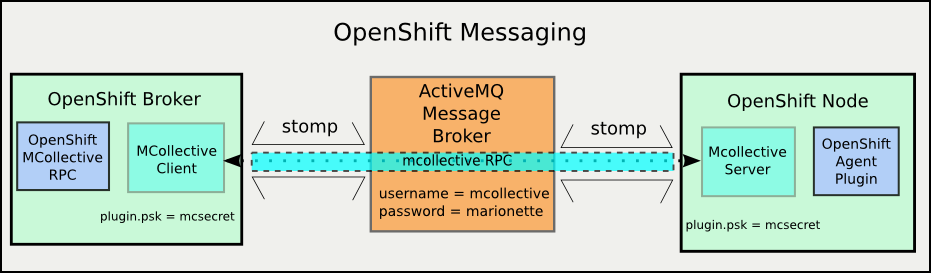
The Datastore and DNS services use a single point-to-point connection between the broker and the update server. The messaging services use an intermediate message broker (ActiveMQ, not to be confused with the OpenShift broker). This means that I need to configure and check not just one points, but three:

  • Mcollective client to (message) broker (on OpenShift broker)
  • Mcollective server to (message) broker (on OpenShift node)
  • End to End

I'm using the ActiveMQ message broker to carry MCollective RPC messages. The message broker is interchangeable. MCollective can be carried over any one of several messaging protocols. I'm using the Stomp protocol for now, though MCollective is deprecating Stomp in favor of a native ActiveMQ (AMQP?) messaging protocol.

OpenShift Messaging Components


In a previous post I set up an ActiveMQ message broker to be used for communication between the OpenShift broker and nodes. In this one I'm going to connect the OpenShift components to the messaging service, verify both connections and then verify that I can send messages end-to-end.

Hold on for the ride, it's a long one (even for me)

Mea Culpa: I'm referring to what MCollective does as "messaging" but that's not strictly true. ActiveMQ, RabbitMQ, QPID are message broker services. MCollective uses those, but actually, MCollective is an RPC (Remote Procedure Call) system. Proper messaging is capable of much more than MCollective requires, but to avoid a lot of verbal knitting I'm being lazy and calling MCollective "messaging".

The Plan

Since this is a longer process than any of my previous posts, I'm going to give a little road-map up front so you know you're not getting lost on the way. Here are the landmarks between here and a working OpenShift messaging system:
  1. Ingredients: Gather configuration information for messaging setup.
  2. Mcollective Client -
    Establish communications between the Mcollective client  and the ActiveMQ server
    (OpenShift broker host to message broker host)
  3. MCollective Server -
    Establish communications beween the MCollective server and the ActiveMQ server
    (OpenShift node host to message broker host)
  4. MCollective End-To-End -
    Verify MCollective communication from client to server
  5. OpenShift Messaging and Agent -
    Install OpenShift messaging interface definition and agent packages on both OpenShift broker and node

Ingredients

VariableValue
ActiveMQ Servermsg1.infra.example.com
Message Bus
topic usernamemcollective
topic passwordmarionette
admin passwordmsgadminsecret
Message End
passwordmcsecret
  • A running ActiveMQ service
  • A host to be the MCollective client (and after that an OpenShift broker)
  • A host to run the MCollective service (and after that an OpenShfit node)
On the Mcollective client host, install these RPMs
  • mcollective-client
  • rubygem-openshift-origin-msg-broker-mcollective
On the MCollective server (OpenShift node) host, install these RPMs
  • mcollective
  • openshift-origin-msg-node-mcollective

Secrets and more Secrets


As with all secure network services, messaging requires authentication. Messaging has a twist though. You need two sets of authentication information, because, underneath, you're actually using two services. When you send a message to an end-point, the end point has to be assured that you are someone who is allowed to send messages. Like with a letter, having some secret code or signature so that you can be sure the letter isn't forged.

Now imagine a special private mail system. Before the mail carrier will accept a letter, you have to give them the secret handshake so that they know you're allowed to send letters. On the delivery end, the mail carrier requires not just a signature but a password before handing over the letter.

That's how authentication works for messaging systems.

When I set up the ActiveMQ service I didn't create a separate user for writing to the queue (sending a letter) and for reading (receiving) but I probably should have. As it is, getting a message from the OpenShift broker to an OpenShift node through MCollective and ActiveMQ requires two passwords and one username.

  • mcollective endpoint secret
  • ActiveMQ username
  • ActiveMQ password

The ActiveMQ values will have to match those I set on the ActiveMQ message broker in the previous post. The MCollective end point secret is only placed in the MCollective configuration files. You'll see those soon.

MCollective Client (OpenShift Broker)


The OpenShift broker service sends messages to the OpenShift nodes. All of the messages (currently) originate at the broker. This means that the nodes need to have a process running which connects to the message broker and registers to receive MColletive messages.

Client configuration: client.cfg


The MCollective client is (predictably) configured using the /etc/mcollective/client.cfg file. For the purpose of connecting to the message broker, only the connector plugin values are interesting, and for end-to-end communications I need the securityprovider plugin as well. The values related to logging are useful debugging too.


# Basic stuff
topicprefix     = /topic/
main_collective = mcollective
collectives     = mcollective
libdir          = /usr/libexec/mcollective
loglevel        = log   # just for testing, normally 'info'

# Plugins
securityprovider = psk
plugin.psk       = mcsecret

# Middleware
connector         = stomp
plugin.stomp.host = msg1.infra.example.com
plugin.stomp.port = 61613
plugin.stomp.user = mcollective
plugin.stomp.user = marionette

NOTE:if you're running on RHEL6 or CentOS 6 instead of Fedora you're going to be using the SCL version of Ruby and hence MCollective. The file is then at the SCL location:

/opt/rh/ruby193/root/etc/mcollective/client.cfg

Now I can test connections to the ActiveMQ message broker, though without any servers connected, it won't be very exciting (I hope).

Testing client connections


MCollective provides a command line tool for sending messages: mco . mco is capable of several other 'meta' operations as well. The one I'm interested in first is 'mco ping'. With mco ping I can verify the connection to the ActiveMQ service (via the Stomp protocol) .

The default configuration file is owned by root and is not readable by ordinary users. This is because it contains plain-text passwords (There are ways to avoid this, but that's for another time). This means I have to either run mco commands as root, or create a config file that is readable. I'm going to use sudo to run my commands as root.

The mco ping command connects to the messaging service and asks all available MCollective servers to respond. Since I haven't connected any yet, I won't get any answers, but I can at least see that I'm able to connect to the message broker, send queries. If all goes well I should get a nice message saying "no one answered".


sudo mco ping


---- ping statistics ----
No responses received

If that's what you got, feel free to skip down to the MCollective Server section.

Debugging client-side configuration errors


There are a couple of obvious possible errors:
  1. Incorrect broker host
  2. broker service not answering
  3. Incorrect messaging username/password
The first two will appear the same to the MCollective client. Check the simple stuff first. If I'm sure that the host is correct then I'll have to diagnose the problem on the other (and write another blog post). Here's how that looks:

sudo mco ping
connect to localhost failed: Connection refused - connect(2) will retry(#0) in 5
connect to localhost failed: Connection refused - connect(2) will retry(#1) in 5
connect to localhost failed: Connection refused - connect(2) will retry(#2) in 5
^C
The ping application failed to run, use -v for full error details: Could not connect to Stomp Server: 

Note the message Could not connect to the Stomp Server.

If you get this message, check these on the OpenShift broker host:

  1. The plugin.stomp.host value is correct
  2. The plugin.stomp.port value is correct
  3. The host value resolves to an IP address in DNS
  4. The ActiveMQ host can be reached from the OpenShift Broker host (by ping or SSH)
  5. You can connect to Stomp port on the ActiveMQ broker host
    telnet msg1.example.com 61613 (yes, telnet is a useful tool) 

If all of these are correct, then look on the ActiveMQ message broker host:

  1. The ActiveMQ service is running
  2. The Stomp transport TCP ports match the plugin.stomp.port value
  3. The host firewall is allowing inbound connections on the Stomp port

The third possibility indicates an information or configuration mismatch between the MCollective client configuration and the ActiveMQ server.  That will look like this:

sudo mco ping
transmit to msg1.infra.example.com failed: Broken pipe
connection.receive returning EOF as nil - resetting connection.
connect to localhost failed: Broken pipe will retry(#0) in 5

The ping application failed to run, use -v for full error details: Stomp::Error::NoCurrentConnection

You can get even more gory details by changing the client.cfg to set the log level to debug and send the log output to the console:

...
loglevel = debug # instead of 'log' or 'info'
logger_type = console # instead of 'file', or 'syslog' or unset (no logging)
...

I'll spare you what that looks like here.

MCollective Server (OpenShift Node)


The mcollective server is a process that connects to a message broker, subscribes to (registers to receive messages from) one or more topics and then listens for incoming messages. When it accepts a message, the mcollective server passes it to a plugin module for execution and then returns any response.  All OpenShift node hosts run an MCollective server which connects to one or more of the ActiveMQ message brokers.

Configure the MCollective service daemon: server.cfg 


I bet you have already guessed that the MCollective server configuration file is /etc/mcollective/server.cfg

# Basic stuff
topicprefix     = /topic/
main_collective = mcollective
collectives     = mcollective
libdir          = /usr/libexec/mcollective
logfile         = /var/log/mcollective.log
loglevel        = debug # just for setup, normally 'info'
daemonize       = 1
classesfile     = /var/lib/puppet/state/classes.txt

# Plugins
securityprovider = psk
plugin.psk       = mcsecret

# Registration
registerinterval = 300
registration     = Meta

# Middleware
connector         = stomp
plugin.stomp.host = msg1.infra.example.com
plugin.stomp.port = 61613
plugin.stomp.user = mcollective
plugin.stomp.password = marionette


# NRPE
plugin.nrpe.conf_dir  = /etc/nrpe.d

# Facts
factsource = yaml
plugin.yaml = /etc/mcollective/facts.yaml

NOTE: again the mcollective config files will be in /opt/rh/ruby193/root/etc/mcollective/ if you are running on RHEL or CentOS.

The server configuration looks pretty similar to the client.cfg. The securityprovider plugin must have the same values, because that's how the server knows that it can accept a message from the clients. The plugin.stomp.* values are the same as well, allowing the MCollective server to connect to the ActiveMQ service on the message broker host. It's really a good idea for the logfile value to be set so that you can observe the incoming messages and their responses. The loglevel is set to debug to start so that I can see all the details of the connection process. Finally the daemonize value is set to 1 so that the mcollectived will run as a service.

The mcollectived will complain if the YAML file does not exist or if the Meta registration plugin is not installed and selected. Comment those out for now. They're out of scope for this post.

Running the MCollective service


When you're satisfied with the configuration, start the mcollective service and verify that it is running:


sudo service mcollective start
Redirecting to /bin/systemctl start  mcollective.service
ps -ef | grep mcollective
root     13897     1  5 19:37 ?        00:00:00 /usr/bin/ruby-mri /usr/sbin/mcollectived --config=/etc/mcollective/server.cfg --pidfile=/var/run/mcollective.pid

You should be able to confirm the connection to the ActiveMQ server in the log.

sudo tail /var/log/mcollective.log 
I, [2013-09-19T19:53:21.317197 #16544]  INFO -- : mcollectived:31:in `
' The Marionette Collective 2.2.3 started logging at info level I, [2013-09-19T19:53:21.349798 #16551] INFO -- : stomp.rb:124:in `initialize' MCollective 2.2.x will be the last to fully support the 'stomp' connector, please migrate to the 'activemq' or 'rabbitmq' connector I, [2013-09-19T19:53:21.357215 #16551] INFO -- : stomp.rb:82:in `on_connecting' Connection attempt 0 to stomp://mcollective@msg1.infra.example.com:61613 I, [2013-09-19T19:53:21.418225 #16551] INFO -- : stomp.rb:87:in `on_connected' Conncted to stomp://mcollective@msg1.infra.example.com:61613 ...

If you see that, you can skip down again to the next section, MCollective End-to-End

Debugging MCollective Server Connection Errors


Again the two most likely problems are that the host or the stomp plugin are mis-configured.


sudo tail /var/log/mcollective.log
I, [2013-09-19T20:05:50.943144 #18600]  INFO -- : stomp.rb:82:in `on_connecting' Connection attempt 1 to stomp://mcollective@msg1.infra.example.com:61613
I, [2013-09-19T20:05:50.944172 #18600]  INFO -- : stomp.rb:97:in `on_connectfail' Connection to stomp://mcollective@msg1.infra.example.com:61613 failed on attempt 1
I, [2013-09-19T20:05:51.264456 #18600]  INFO -- : stomp.rb:82:in `on_connecting' Connection attempt 2 to stomp://mcollective@msg1.infra.example.com:61613
...

If I see this, I need to check the same things I would have for the client connection. On the MCollective server host:

  • plugin.stomp.host is correct
  • plugin.stomp.port matches Stomp transport TCP port on the ActiveMQ service
  • Hostname resolves to an IP address
  • ActiveMQ host can be reached from the MCollective client host (ping or SSH)

On the ActiveMQ message broker:

  • ActiveMQ service is running
  • Any firewall rules allow inbound connections to the Stomp TCP port
The other likely error is username/password mismatch. If you see this in your mcollective logs, check the ActiveMQ user configuration and compare it to your mcollective server plugin.stomp.user and plugin.stomp.password values.

...
I, [2013-09-19T20:15:13.655366 #20240]  INFO -- : stomp.rb:82:in `on_connecting'
 Connection attempt 0 to stomp://mcollective@msg1.infra.example.com:61613
I, [2013-09-19T20:15:13.700844 #20240]  INFO -- : stomp.rb:87:in `on_connected' 
Conncted to stomp://mcollective@msg1.infra.example.com:61613
E, [2013-09-19T20:15:13.729497 #20240] ERROR -- : stomp.rb:102:in `on_miscerr' U
nexpected error on connection stomp://mcollective@msg1.infra.example.com:61613: es_trans: transmit
 to msg1.infra.example.com failed: Broken pipe
...

MCollective End-to-End

Now that I have both the MCollective client and server configured to connect to the ActiveMQ message broker I can confirm the connection end to end. Remember that 'mco ping' command I used earlier? When there are connected servers, they should answer the ping request.

 sudo mco ping
node1.infra.example.com time=138.60 ms


---- ping statistics ----
1 replies max: 138.60 min: 138.60 avg: 138.60 

OpenShift Node 'plugin' agent

Now I'm sure that both MCollective and ActiveMQ are working end-to-end between the OpenShift broker and node. But there's no "OpenShift" in there yet.  I'm going to add that now.

There are three packages that specifically deal with MCollective and interaction with OpenShift:

  • openshift-origin-msg-common.noarch (misnamed, specifically mcollective)
  • rubygem-openshift-origin-msg-broker-mcollective
  • openshift-origin-msg-node-mcollective.noarch

The first package defines the messaging protocol for OpenShift.  It includes interface specifications for all of the messages, their arguments and expected outputs.  This is used on both the MCollective client and server side to produce and validate the OpenShift messages. The broker package defines the interface that the OpenShift broker (a Rails application) uses to generate messages to the nodes and process the returns. The node package defines how the node will respond when it receives each message.

The OpenShift node also requires several plugins that, while not required for messaging per-se, will cause the OpenShift agent to fail if they are not present
  • rubygem-openshift-origin-frontend-nodejs-websocket
  • rubygem-openshift-origin-frontend-apache-mod-rewrite
  • rubygem-openshift-origin-container-selinux
When these packages are installed on the OpenShift broker and node, mco will have a new set of messages available. MCollective calls added sets of messages... (OVERLOAD!) 'plugins'.  So, to see the available message plugins, use mco plugin doc.  To see the messages in the openshift plugin, use mco plugin doc openshift.

Mcollective client: mco


I've used mco previously just to send a ping message from a client to the servers.  This just collects a list of the MCollective servers listening. The mco command can also send complete messages to remote agents.  Now I need to learn how to determine what agents and messages are available and how to send them a message.  Specifically, the OpenShift agent has an echo message which simply returns a string which was sent in the message.  Now that all of the required OpenShift messaging components are installed, I should be able to tickle the OpenShift agent on the node from the broker.  This is what it looks like when it works properly:

sudo mco rpc openshift echo msg=foo
Discovering hosts using the mc method for 2 second(s) .... 1

 * [ ========================================================> ] 1 / 1


node1.infra.example.com 
   Message: foo
      Time: nil


Finished processing 1 / 1 hosts in 25.49 ms

As you might expect, this has more than its fair share of interesting failure modes.  The most likely thing you'll see from the mco command is this:

sudo mco rpc openshift echo msg=foo
Discovering hosts using the mc method for 2 second(s) .... 0

No request sent, we did not discover any nodes.


This isn't very informative, but it does at least indicate that the message was sent and nothing answered. Now I have to look at the MCollective server logs to see what happened. After setting the loglevel to 'debug' in /etc/mcollective/server.cfg, restarting the mcollective service and re-trying the mco rpc command, I can find this in the log file:


sudo grep openshift /var/log/mcollective.log 
D, [2013-09-20T14:18:05.864489 #31618] DEBUG -- : agents.rb:104:in `block in findagentfile' Found openshift at /usr/libexec/mcollective/mcollective/agent/openshift.rb
D, [2013-09-20T14:18:05.864637 #31618] DEBUG -- : pluginmanager.rb:167:in `loadclass' Loading MCollective::Agent::Openshift from mcollective/agent/openshift.rb
E, [2013-09-20T14:18:06.360415 #31618] ERROR -- : pluginmanager.rb:171:in `rescue in loadclass' Failed to load MCollective::Agent::Openshift: error loading openshift-origin-container-selinux: cannot load such file -- openshift-origin-container-selinux
E, [2013-09-20T14:18:06.360633 #31618] ERROR -- : agents.rb:71:in `rescue in loadagent' Loading agent openshift failed: error loading openshift-origin-container-selinux: cannot load such file -- openshift-origin-container-selinux
D, [2013-09-20T14:18:13.741055 #31618] DEBUG -- : base.rb:120:in `block (2 levels) in validate_filter?' Failing based on agent openshift
D, [2013-09-20T14:18:13.741175 #31618] DEBUG -- : base.rb:120:in `block (2 levels) in validate_filter?' Failing based on agent openshift

It turns out that the reason those three additional packages are requires is that they provide facters to MCollective. Facter is a tool which gathers a raft of information about a system and makes it quickly available to MCollective. The rubygem-openshift-origin-node package adds some facter code, but those facters will fail if the additional packages aren't present. If you do the "install everything" these resolve automatically, but if you install and test things piecemeal as I am they show up as missing requirements.

After I add those packages I can send an echo message and get a successful reply.  If you can discover the MCollective servers from the client with mco ping, but can't get a response to an mco rpc openshift echo message, then the most likely problem is that the OpenShift node packages are missing or misconfigured. Check the logs and address what you find.

Finally! (sort of)

At this point, I'm confident that the Stomp and MCollective services are working and that the OpenShift agent is installed on the node and will at least respond to the echo message.  I was going to also include testing through the Rails console, but this has gone on long enough.  That's next.

References